
Understanding Certificate Authentication: A Complete Guide

TL;DR:
- Certificate authentication verifies identity through digital certificates issued by trusted authorities, replacing passwords with cryptographic proof. It relies on the chain of trust, real-time revocation checks, and private key protection to ensure secure machine and user verification. Proper management, automation, and awareness of best practices are essential for maintaining robust certificate security.
Certificate authentication is defined as the process of verifying identity through digital certificates issued by trusted authorities, replacing passwords with cryptographic proof. Rather than relying on a shared secret that can be stolen or guessed, certificate-based authentication confirms identity through mathematical relationships between public and private keys managed by Public Key Infrastructure (PKI). This approach is now foundational to securing web traffic via Transport Layer Security (TLS), corporate VPNs, Wi-Fi networks, and machine-to-machine communications. Understanding certificate authentication means understanding how Certificate Authorities (CAs), X.509 certificates, and protocols like the Online Certificate Status Protocol (OCSP) work together to create a verifiable chain of trust. Whether you are an IT administrator, a security professional, or an organization protecting sensitive credentials, this guide explains every layer of the process with clarity and precision.
How does certificate authentication work?
Certificate authentication works by binding a verified identity to a cryptographic key pair, then using that binding to prove identity during a secure connection. The process begins with a CA, such as DigiCert, GlobalSign, or an internal enterprise CA, validating an applicant’s identity before issuing a digital certificate. That certificate, formatted as an X.509 standard document, contains the subject’s name, public key, validity dates, and the CA’s digital signature. Tampering with any field in the certificate breaks the CA’s signature, causing immediate verification failure.

The authentication handshake step by step
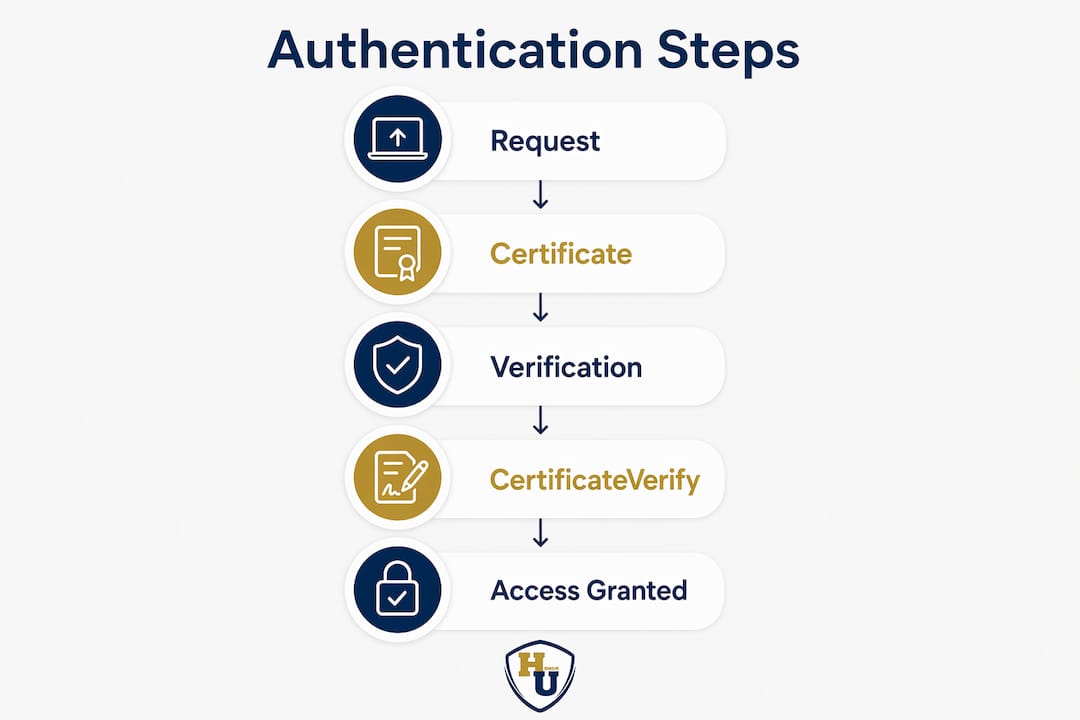
The following steps describe how a standard TLS or mutual TLS (mTLS) authentication exchange proceeds:
- Client connects to server. The client initiates a TLS handshake and signals which cipher suites and certificate types it supports.
- Server presents its certificate. The server sends its X.509 certificate so the client can verify the server’s identity before transmitting any data.
- Server requests client certificate (mTLS only). In mutual TLS authentication, the server sends a CertificateRequest message, requiring the client to prove its identity as well.
- Client sends Certificate and CertificateVerify messages. The client presents its own certificate and then signs a message with its private key. This signature is the proof of key possession.
- Server verifies the client. The server uses the public key in the client’s certificate to confirm the signature is valid, then checks issuer trust, validity dates, and revocation status.
- Session keys are established. Both parties exchange Finished messages and derive symmetric session keys for encrypted communication.
The CertificateVerify message is the critical step that separates certificate authentication from simply presenting a credential. Anyone can copy a certificate, but only the holder of the matching private key can produce a valid signature. This is why secure certificate authentication methods store private keys in hardware security modules (HSMs) or Trusted Platform Module (TPM) chips rather than in software files.
Pro Tip: Never export private keys from the device where they were generated. Keeping the private key bound to a specific device or HSM is the single most effective way to prevent credential theft in a certificate-based system.
Authentication succeeds only when four conditions are met simultaneously: the certificate is issued by a trusted CA, the certificate is currently valid, the certificate has not been revoked, and the requester holds the matching private key. Failing any one of these conditions terminates the session immediately.
What is the certificate verification process?
The certificate verification process is a multi-step validation sequence that confirms a certificate is genuine, current, and trustworthy before granting access. Practical certificate validation involves verifying an unbroken chain to a trusted root, confirming signature validity, checking date ranges, matching hostnames, and confirming revocation status. Each step is mandatory. Skipping any one of them creates a security gap that attackers can exploit.
The chain of trust
Certificate trust is evaluated as a path-building problem. Every certificate in the chain must be valid and meet policy constraints, otherwise the entire chain is considered untrusted. The chain has three layers:
- Root CA certificate: Self-signed by a trusted authority like DigiCert or Let’s Encrypt. Stored in the operating system or browser trust store.
- Intermediate CA certificate: Issued by the root CA to an intermediate authority. This layer insulates the root from direct exposure.
- Leaf certificate: The end-entity certificate issued to a specific server, user, or device. This is the certificate presented during authentication.
A broken link anywhere in this chain produces a verification failure. For example, if an intermediate CA certificate expires and is not renewed, every leaf certificate it issued becomes untrusted, even if those leaf certificates are individually valid.
Revocation checking: crls and OCSP
A valid CA signature is necessary but not sufficient for trust. Certificates can be revoked after issuance due to key compromise, employee termination, or policy violation. Systems must enforce real-time revocation checks to block compromised credentials.
Two primary revocation mechanisms exist:
- Certificate Revocation Lists (CRLs): Periodic lists published by CAs containing serial numbers of revoked certificates. CRLs can be large and may be hours or days out of date.
- Online Certificate Status Protocol (OCSP): A real-time query protocol that returns a “good,” “revoked,” or “unknown” status for a specific certificate. OCSP is faster and more current than CRLs.
OCSP stapling improves on standard OCSP by having the server fetch and cache the CA-signed OCSP response, then embed it directly in the TLS handshake. The client receives the revocation status without making a separate network request. This reduces latency and eliminates dependency on the CA’s OCSP responder being available at the moment of authentication.
Pro Tip: Configure OCSP stapling on all public-facing servers and set up CRL caching as a fallback. If your OCSP responder goes offline without a failover strategy, authentication decisions may fail or default to insecure “soft fail” behavior.
| Revocation Method | Speed | Freshness | Scalability | Best Use Case |
|---|---|---|---|---|
| CRL | Slow (large file download) | Hours to days old | Low for large deployments | Offline environments |
| OCSP | Fast (single query) | Near real-time | High | Web servers, VPNs |
| OCSP Stapling | Fastest (embedded in handshake) | CA-signed, cached | Very high | High-traffic TLS servers |
Common certificate errors map directly to verification failures. Expired validity dates, mismatched hostnames, broken certificate chains, and signature verification failures each produce distinct error codes. Understanding these error types makes troubleshooting far more efficient than trial-and-error certificate replacement.
How does certificate authentication compare to passwords and tokens?
Certificate authentication is fundamentally stronger than password-based authentication because it relies on cryptographic proof rather than a shared secret. Replacing passwords with certificate-based methods removes the private key from any network transmission entirely. The server never sees the secret. This makes phishing attacks, credential stuffing, and brute-force attacks structurally ineffective against certificate-based systems.
Strengths and limitations at a glance
| Authentication Method | Phishing Resistance | Credential Theft Risk | Management Complexity | Best Fit |
|---|---|---|---|---|
| Password | None | High (reuse, breaches) | Low | Legacy systems |
| One-time token (TOTP) | Partial | Medium (SIM swap, interception) | Medium | Consumer MFA |
| Hardware token (FIDO2/YubiKey) | High | Low | Medium | High-security users |
| Certificate (PKI) | Very high | Very low (private key stays local) | High | Enterprise, machines, zero trust |
The primary limitation of certificate authentication is management complexity. Every certificate has an expiration date, and organizations with thousands of devices or users face significant operational overhead if certificate lifecycle management is not automated. An expired certificate in a VPN gateway or Wi-Fi authentication system causes an outage that looks identical to a network failure, making diagnosis difficult.
Token-based methods like TOTP (Time-based One-Time Passwords) used in apps like Google Authenticator offer a middle ground. They are easier to deploy than PKI but remain vulnerable to real-time phishing attacks where an attacker relays the token before it expires. Certificate authentication eliminates this attack vector entirely because the private key never leaves the authenticating device.
Certificate authentication excels in three specific contexts:
- Zero trust network architectures, where every device and user must be continuously verified regardless of network location.
- Machine-to-machine communications, such as API servers, IoT devices, and microservices, where no human is present to enter a password.
- Regulated industries like healthcare and finance, where audit trails and non-repudiation requirements demand cryptographic proof of identity.
What are the best practices for certificate authentication?
Certificate authentication is widely used across VPN access, enterprise Wi-Fi via the 802.1X standard, application login, and IoT device security. Each of these environments has distinct requirements, but the underlying best practices apply universally.
Implementation and maintenance steps
-
Automate certificate issuance and renewal. Manual certificate management at scale is the leading cause of outages and security gaps. Protocols like Simple Certificate Enrollment Protocol (SCEP) and Automatic Certificate Management Environment (ACME) automate the full lifecycle. Integrating with MDM platforms like Microsoft Intune or Jamf Pro delivers certificates to devices automatically and renews them before expiration.
-
Use short-lived certificates where possible. Short-lived certificates, typically with validity periods of 24 hours to 90 days, reduce the window of exposure if a private key is compromised. Let’s Encrypt popularized 90-day certificates for web servers. Some zero trust architectures issue certificates valid for only a single session.
-
Enforce private key protection. Store private keys in TPM chips, HSMs, or secure enclaves. Never allow private key export. Bind certificates to specific devices using device attestation during enrollment.
-
Maintain a certificate inventory. Organizations frequently discover expired certificates only after an outage occurs. Tools like Venafi, Keyfactor, or Microsoft Certificate Services provide visibility into every certificate in the environment, including expiration dates and issuing CAs.
-
Configure revocation checking with failover. Deploy OCSP stapling on servers and configure CRL distribution points as a backup. Define a clear policy for “hard fail” versus “soft fail” behavior when revocation status cannot be determined.
-
Test certificate validation regularly. Use tools like SSL Labs’ SSL Server Test for public-facing servers and internal scanning tools for enterprise environments. Catching a misconfigured certificate chain before it causes an authentication failure is far less costly than responding to an incident.
The certificate authentication process for physical credentials follows a parallel logic: the document’s issuing authority, the integrity of its presentation, and the absence of tampering all contribute to its legitimacy. Digital and physical credential verification share the same foundational principle of trusted issuance and verifiable integrity.
Pro Tip: Set certificate renewal alerts at 60 days, 30 days, and 7 days before expiration. Three-tier alerting catches the certificates that slip through automated renewal due to configuration drift or decommissioned enrollment agents.
Key takeaways
Certificate authentication succeeds when a trusted CA issues the certificate, the chain of trust is unbroken, revocation status is confirmed in real time, and the private key never leaves the authenticating device.
| Point | Details |
|---|---|
| Core mechanism | Authentication relies on cryptographic key pairs, not transmitted secrets, making credential theft structurally difficult. |
| Chain of trust | Every certificate from root CA to leaf must be valid; one broken link invalidates the entire chain. |
| Revocation is mandatory | OCSP and CRLs must be checked in real time; a valid signature alone does not confirm a certificate is trustworthy. |
| Automate lifecycle management | Manual certificate renewal at scale causes outages; SCEP, ACME, and MDM platforms remove human error from the process. |
| Strongest use cases | Zero trust architectures, machine-to-machine communications, and regulated industries gain the most from certificate-based identity. |
Why certificate authentication deserves more attention than it gets
Most security conversations focus on multi-factor authentication apps, password managers, and phishing training. Certificate authentication rarely gets the same attention, and that gap is a real problem. After working closely with organizations that manage large volumes of credentials, both digital and physical, one pattern becomes clear: the systems that fail most visibly are the ones where certificate management was treated as a one-time setup task rather than an ongoing operational discipline.
The misconception I encounter most often is that certificate authentication is only for large enterprises with dedicated PKI teams. That is no longer true. Let’s Encrypt has made free, automated TLS certificates standard practice. Microsoft Intune and Apple MDM have made device certificate deployment accessible to organizations with fewer than 50 employees. The barrier is not technical complexity anymore. The barrier is awareness.
The second misconception is that a certificate is trustworthy simply because it was issued by a recognized CA. A valid CA signature is the starting point, not the finish line. Revocation status, validity period, and chain integrity all matter equally. Organizations that skip revocation checking because it adds latency are trading a few milliseconds for a meaningful security gap.
Looking ahead, the move toward shorter certificate lifespans is the most significant shift in the field. Google has proposed reducing the maximum TLS certificate validity to 90 days, and some proposals go further toward 47-day maximums. This forces automation and eliminates the “set it and forget it” approach that has caused so many high-profile outages. The organizations that build automated certificate pipelines now will be far better positioned as these standards tighten.
Physical credentials deserve the same discipline. A diploma or professional certificate represents years of work and carries real-world consequences if it is lost, damaged, or presented without proper context. The principles of trusted issuance, integrity, and proper presentation apply whether the credential is digital or printed on paper.
, Manager
Protect your physical certificates with the same care as your digital credentials
Digital certificates secure your network. Physical certificates secure your legacy. A diploma or professional credential represents a milestone that deserves presentation equal to its significance.

Wehonoru designs premium tent-style document covers with metallic foil printing, built to preserve and present physical certificates with the same professionalism that PKI brings to digital identity. With 1-day production turnaround, no minimum order quantities, and made-to-fit sizing for non-standard documents, Wehonoru serves schools, corporate HR teams, healthcare organizations, and individuals alike. Explore the Classic Diploma of Graduation cover collection and give every earned credential the presentation it deserves. Free shipping applies on orders over $35.
FAQ
What is certificate authentication in simple terms?
Certificate authentication is a method of proving identity using a digital certificate issued by a trusted Certificate Authority instead of a password. The system verifies the certificate’s validity, chain of trust, and the holder’s possession of the matching private key before granting access.
What is the difference between TLS and mTLS?
Standard TLS verifies only the server’s identity, while mutual TLS (mTLS) requires both the client and server to present valid certificates. mTLS provides two-way authentication, making it the preferred method for machine-to-machine communications and zero trust environments.
Why do certificate errors occur during authentication?
Certificate errors occur when validation checks fail, including expired validity dates, broken certificate chains, hostname mismatches, or revocation status failures. Each error type maps to a specific validation step, making systematic troubleshooting more effective than replacing certificates at random.
How often should certificates be renewed?
Certificate renewal frequency depends on the validity period set at issuance, but best practice is to renew before 75% of the validity period has elapsed. Short-lived certificates issued by systems like Let’s Encrypt renew automatically every 60–90 days, reducing the risk window if a private key is ever compromised.
What is OCSP stapling and why does it matter?
OCSP stapling is a method where the server fetches and caches the CA-signed revocation status response and embeds it in the TLS handshake. This eliminates separate client queries to the CA’s OCSP responder, reducing latency and removing a potential point of failure during authentication.
Recommended
Taylor Pace writes Honor U guides. Blair Black reviews them. Honor U sells empty covers and holders.