
Educational Certificate Display Process: Complete Guide

TL;DR:
- Effective display of educational certificates involves using archival materials for physical framing and linking digital credentials to verification pages. Implementing clear status indicators and scalable organizational strategies ensures credibility and accessibility for in-person and online audiences. Combining high-quality presentation with reliable verification systems reinforces trust in credentials and credential culture.
The educational certificate display process is the set of methods and best practices used to present, preserve, and verify academic credentials in both physical and digital formats. Whether you are a recent graduate hanging your first diploma or an HR director managing hundreds of employee certifications, how you display those documents directly affects how they are perceived by employers, peers, and institutions. This guide covers archival framing techniques, digital platform options, verification page design, and scalable organizational strategies, giving you a complete framework for showcasing academic achievements with confidence and lasting quality.
What are the best physical methods for displaying educational certificates?
Physical certificate presentation requires more than a standard frame from a big-box store. The materials you choose determine whether your document survives decades or deteriorates within years.

Archival-safe framing uses acid-free mats, UV-protective glazing glass, and archival backing boards as a combined preservation system. UV-protective glass blocks up to 99% of harmful rays, which directly prevents ink fading and paper yellowing over time. Acid-free mats eliminate the chemical off-gassing that standard cardboard mounts produce, and archival backing boards complete the barrier against moisture and environmental contaminants.
Choosing between professional framing and DIY options
Professional custom framing services offer specific technical advantages that DIY kits cannot replicate. Reversible hinges and double mounts protect embossed seals and wax details while allowing the document to be removed without damage. That reversibility matters when a certificate needs to be re-verified, updated, or transferred to a new frame years later.
DIY framing is a practical choice for budget-conscious individuals, provided you source the correct materials. Look for frames labeled “conservation grade” or “museum quality,” and confirm that the mat board carries a Photographic Activity Test (PAT) certification. Avoid pressure-sensitive tapes, rubber cement, or any adhesive that contacts the document directly.
Key environmental controls for physical certificate display include:
- Avoid direct sunlight. Even UV-protective glass cannot compensate for prolonged direct exposure. Position frames on interior walls away from south-facing windows.
- Control humidity. Relative humidity above 65% promotes mold growth and paper warping. Maintain indoor humidity between 30% and 50%.
- Keep away from heat sources. Radiators, HVAC vents, and fireplaces accelerate paper aging and can cause mat boards to warp.
- Use proper hanging hardware. D-ring hangers with two anchor points distribute weight evenly and prevent the frame from tilting over time.
- Match the frame to the space. A diploma displayed in a medical office calls for a different aesthetic than one in a home study. Select molding profiles and mat colors that complement the room without overshadowing the document itself.
Pro Tip: Keep a high-quality digital scan and attach a printed backup copy behind the framed certificate. If the original is ever damaged by water, fire, or handling, you retain a reference copy for re-issuance requests.
The physical display of a certificate is also a statement of personal and institutional pride. Selecting a frame with an heirloom feel, such as solid wood molding with a gold or silver finish, communicates the weight of the achievement to every visitor who sees it. For guidance on preserving physical diplomas, the material and security considerations go hand in hand.
How can digital platforms display educational certificates effectively?
Digital credential display is now a standard part of the certificate presentation process, particularly for online education providers, corporate training departments, and individual professionals managing their public profiles.
The most flexible tool for WordPress-based learning management systems is the LearnDash “Show Certificates Anywhere” plugin, which allows embedding certificates via shortcode, Gutenberg block, or Elementor widget. The shortcode [ld_earned_certificates] displays all certificates earned by the current user, while [ld_earned_certificates user_id="5"] targets a specific learner. This level of filtering is critical for organizations that need to display credentials by department, cohort, or course type without building custom code.
Steps to set up a digital certificate display
- Select your display platform. Decide whether certificates will appear on a learner dashboard, a public profile page, or an embedded section of a course completion page. Each placement serves a different audience and purpose.
- Choose your display template. The LearnDash plugin supports color-coded badges and multiple layout templates, allowing you to match the visual style of your institution or brand.
-
Apply user-specific filtering. Use the
user_idparameter to show only the certificates relevant to each viewer. This prevents credential confusion in multi-user environments. - Separate course certificates from quiz certificates. The plugin supports both certificate types independently. Displaying them in distinct sections helps viewers understand the scope and level of each credential.
- Add verification links. Each certificate display should include a direct URL or QR code linking to a public verification page. A static image alone is not sufficient for third-party authenticity checks.
- Test for mobile responsiveness. A certificate that renders well on a desktop but breaks on a smartphone loses credibility. Confirm that your chosen template scales correctly across screen sizes.
- Review accessibility compliance. Alt text for certificate images, sufficient color contrast for badge labels, and keyboard-navigable layouts are required for compliance with WCAG 2.1 standards. The W3C Digital Credentials specification outlines user-mediated consent and transient activation controls as core requirements for digital credential workflows, meaning users must actively control when and how their credentials are presented.
For professionals managing their own credentials, LinkedIn’s Licenses and Certifications section is the most widely recognized digital display channel. Adding credentials to LinkedIn requires fields including certificate title, issuing organization, issue date, expiration date, credential ID, and a verification URL. Including a verification URL transforms a passive listing into an active, checkable credential. Recruiters and hiring managers increasingly expect that link to be present. The importance of verified credentials extends directly to how LinkedIn profiles are evaluated during hiring decisions.
What are best practices for certificate verification and authenticity display?
Certificate verification is the process by which a third party, typically an employer, recruiter, or licensing board, confirms that a displayed credential is genuine, current, and issued by a recognized authority. The design of your verification page determines whether that process takes seconds or creates doubt.
Effective verification pages show a clear status indicator near the top of the page. The three standard statuses are Valid, Expired, and Revoked. Placing the status prominently means a recruiter does not need to read the entire page to get the answer they need. That single design decision separates a trustworthy credential display from one that creates friction.
Best practices for verification page design include:
- Lead with status, not details. The Valid/Expired/Revoked indicator belongs at the top, above the certificate holder’s name and course information.
- Keep metadata minimal. Display the certificate title, issuing organization, issue date, and expiration date. Avoid exposing unnecessary personal data such as full address, student ID numbers, or internal system identifiers.
- Use QR codes on physical certificates. A QR code printed on or attached to the physical document links directly to the verification page, connecting the physical and digital display in one step.
- Maintain HTTPS throughout. An HTTP verification page signals insecurity to both users and search engines. Every verification URL must use a valid SSL certificate.
- Test for broken links regularly. A verification URL that returns a 404 error is worse than no link at all. Schedule monthly checks of all active verification links.
- Apply privacy-first design principles. Privacy-first verification pages separate sensitive recipient personally identifiable information from the public-facing display, presenting only the issuer, timestamp, and cryptographic proof needed to confirm authenticity.
“Robust digital credential sharing includes a human-readable certificate display plus a credential URL linking to a verification page, minimizing disputes based on appearance alone.”, Certify.page
The combination of a well-designed physical certificate and a linked verification page creates a complete credential record. Neither element alone is sufficient for high-stakes verification scenarios such as medical licensing, legal bar admissions, or government security clearances.
How do organizations build a scalable certificate display strategy?
A scalable certificate display strategy addresses three dimensions simultaneously: placement, filtering, and verification output. Organizations that plan for only one or two of these dimensions typically encounter problems as their certificate volume grows.
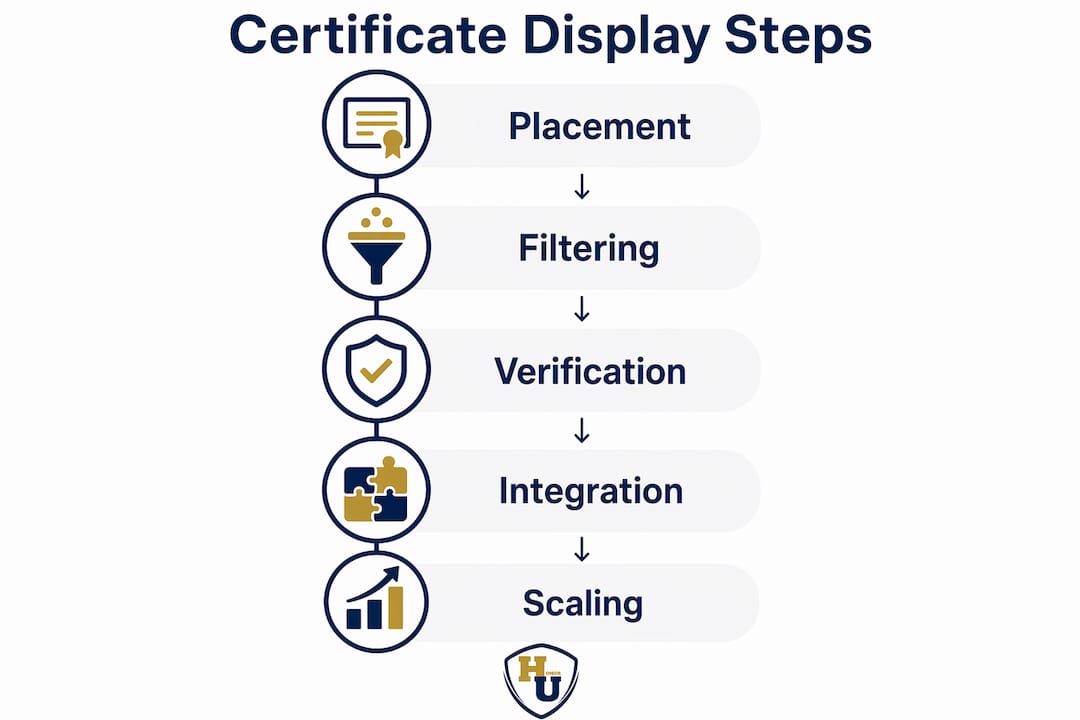
The placement dimension covers where certificates appear: learner dashboards, public profile pages, department intranets, or physical display walls in office lobbies. The filtering dimension determines which certificates each viewer sees, organized by course, quiz, user ID, or department. The verification output dimension defines how third parties confirm authenticity, whether through QR codes, direct URLs, or API-connected verification services.
Physical and digital display combined
The most effective organizational approach combines a physical certificate wall with a digital certificate portal. A physical wall in a training center or corporate lobby communicates achievement culture to visitors and employees alike. The digital portal serves remote workers, external recruiters, and regulatory bodies who need to verify credentials without visiting the location. These two formats reinforce each other rather than compete.
| Display Format | Strengths | Limitations |
|---|---|---|
| Physical framed wall | High visibility, prestige, heirloom quality | No real-time verification, static content |
| Digital learner dashboard | User-specific, filterable, updateable | Requires login access for some viewers |
| Public verification page | Third-party accessible, HTTPS-secured | Depends on uptime and link maintenance |
| LinkedIn profile listing | Recruiter-facing, widely recognized | Controlled by individual, not institution |
Common organizational pitfalls include relying on static certificate images without any linked verification, creating cluttered physical walls without clear labeling or organization by department or date, and failing to update verification status when certificates expire or are revoked. Scalable credential walls must address placement, filtering, and verification outputs simultaneously to avoid these failure modes.
Pro Tip: Use a centralized platform that supports user-specific customization and dynamic status updates. A certificate that shows “Valid” today must automatically update to “Expired” when the renewal date passes, without requiring manual intervention from an administrator.
For organizations reviewing industry standards for certificate holders, the 2026 landscape increasingly expects digital verification to accompany every physical credential, particularly in regulated industries such as healthcare, finance, and education.
Key takeaways
The most effective educational certificate display process combines archival-safe physical presentation with linked digital verification, ensuring credentials remain credible, accessible, and preserved for the long term.
| Point | Details |
|---|---|
| Use archival materials for physical display | Acid-free mats, UV glass, and archival backing boards protect documents for decades. |
| Link every digital certificate to a verification page | Static images alone are insufficient; QR codes and URLs enable fast third-party checks. |
| Lead verification pages with status indicators | Place Valid, Expired, or Revoked status at the top for immediate recruiter clarity. |
| Plan organizational displays in three dimensions | Address placement, filtering, and verification output to build a scalable credential system. |
| Combine physical and digital formats | A framed wall and a digital portal together serve both in-person and remote audiences. |
What the display process reveals about credential culture
After working closely with institutions and individuals on how they present their credentials, one pattern stands out clearly: most people invest heavily in earning a certificate and almost nothing in displaying it well. A degree printed on archival paper, placed in a standard plastic sleeve, and hung in a poorly lit hallway communicates far less than the same document deserves.
The physical framing choice is not vanity. It is a direct signal of how seriously you take the credential. A hospital that displays physician board certifications in quality frames with visible verification QR codes tells patients something concrete about its standards. A corporate training department that publishes a clean digital portal with current, filterable certificates tells auditors and regulators the same thing.
The verification piece is where I see the most consistent failure. Organizations spend months designing certificate templates and zero time testing whether the verification link on that certificate actually works six months later. A broken link on a medical license display is not a minor inconvenience. It creates doubt about the credential itself.
My recommendation is to treat the display process as part of the credential lifecycle, not an afterthought. Build your verification infrastructure before you issue the first certificate. Choose your physical framing materials before the graduation ceremony. And review both systems annually, because a credential that cannot be verified is a credential that cannot be trusted.
For individuals, the single highest-return action is adding a working verification URL to your LinkedIn Licenses and Certifications entry. That one step separates your profile from the majority of candidates who list credentials without any proof of validity.
, Manager
Present your certificates with the quality they deserve
Every certificate represents real effort, real time, and real achievement. The presentation it receives should match that significance. Wehonoru specializes in premium tent-style document covers with metallic foil printing, built for individuals and institutions that take credential presentation seriously. With 1-business-day production, no minimum order quantities, and made-to-fit sizing for non-standard documents, Wehonoru removes every barrier between your achievement and a professional display. Explore the Classic Diploma of Graduation cover for a polished, archival-quality presentation that honors the moment, or browse the Classic High School Diploma cover for graduates at every level.
FAQ
What materials are required for archival-safe certificate framing?
Archival-safe framing requires acid-free mat boards, UV-protective glazing glass, and archival backing boards. These materials work together to block harmful rays, prevent chemical degradation, and control moisture exposure over time.
How do i add an educational certificate to LinkedIn?
Add your certificate under the Licenses and Certifications section on LinkedIn, filling in the certificate title, issuing organization, issue date, expiration date, credential ID, and a verification URL. Including a working verification URL is the most important step for recruiter credibility.
What should a certificate verification page display?
A verification page should show a clear status indicator (Valid, Expired, or Revoked) at the top, followed by the certificate title, issuing organization, and issue date. Avoid exposing unnecessary personal data beyond what is needed to confirm authenticity.
Can organizations display certificates for multiple users on one platform?
Yes. Tools like the LearnDash “Show Certificates Anywhere” plugin support user-specific filtering via shortcodes, allowing organizations to display certificates by individual user ID, course type, or quiz completion on a single platform.
Is a digital image of a certificate sufficient for verification purposes?
A digital image alone is not sufficient for independent verification. Static images or PDFs should always be supplemented with a linked verification page or QR code that allows third parties to confirm authenticity directly with the issuing organization.
Recommended
Taylor Pace writes Honor U guides. Blair Black reviews them. Honor U sells empty covers and holders.