
The Role of Document Folders in Recognition Practices

TL;DR:
- Document folders are essential for organizing, protecting, and presenting recognition materials, enhancing retrieval speed and perceived value. Physical folders provide ceremonial impact, while digital folders ensure accessibility, backup, and compliance, making both indispensable in recognition programs. Limiting folder depth and adopting clear naming conventions improve efficiency, with structured organization boosting credibility and recipient engagement.
Document folders are defined as organizational containers that protect, categorize, and present recognition materials, including diplomas, certificates, and awards, in a way that preserves their physical integrity and communicates their institutional significance. Whether physical or digital, the role of document folders in recognition extends far beyond simple storage. Folders determine how quickly an achievement can be retrieved, how professionally it is displayed, and how meaningfully it is perceived by the recipient and the organization alike. Tools like Wehonoru’s tent-style presentation covers, cloud-based document management platforms, and scanning apps such as Scanner Pro each address a different dimension of this challenge. The result is a recognition system that honors achievement with the same care that went into earning it.
How document folders improve recognition through better organization and retrieval
Poor document organization carries a measurable cost. Knowledge workers waste 20% of their working time searching for information, which translates to roughly 50 hours per year lost to misplaced files. For HR departments managing hundreds of employee certifications, or schools coordinating graduation ceremonies for entire graduating classes, that lost time compounds into real operational disruption.
The problem is widespread. 54% of employees in digital work environments struggle to locate necessary documents, leading to duplicated effort and miscommunication. When recognition materials such as training certificates or professional credentials cannot be found quickly, the achievement they represent loses practical value within the organization.
Document folders solve this by creating a reliable source of truth. When diplomas, awards, and certifications are filed within a consistent folder structure, retrieval becomes predictable rather than accidental. A corporate HR team that organizes employee recognition documents under a clear hierarchy, such as Department, Year, and Award Type, can locate any record in seconds rather than minutes.
The cognitive benefit of spatial folder organization also matters here. Folders allow users to mentally map where documents live, reducing the decision load that comes with open-ended search. This is particularly relevant in high-volume recognition environments, such as university registrar offices or government training programs, where dozens of document types must be managed simultaneously.
- Consistent folder naming reduces the time any team member spends orienting themselves to a new filing system.
- Dedicated recognition folders prevent award documents from being buried among general administrative files.
- Hierarchical folder structures allow both broad overviews and specific retrieval without redundancy.
- Access permissions on digital folders protect sensitive credential documents while keeping them available to authorized staff.
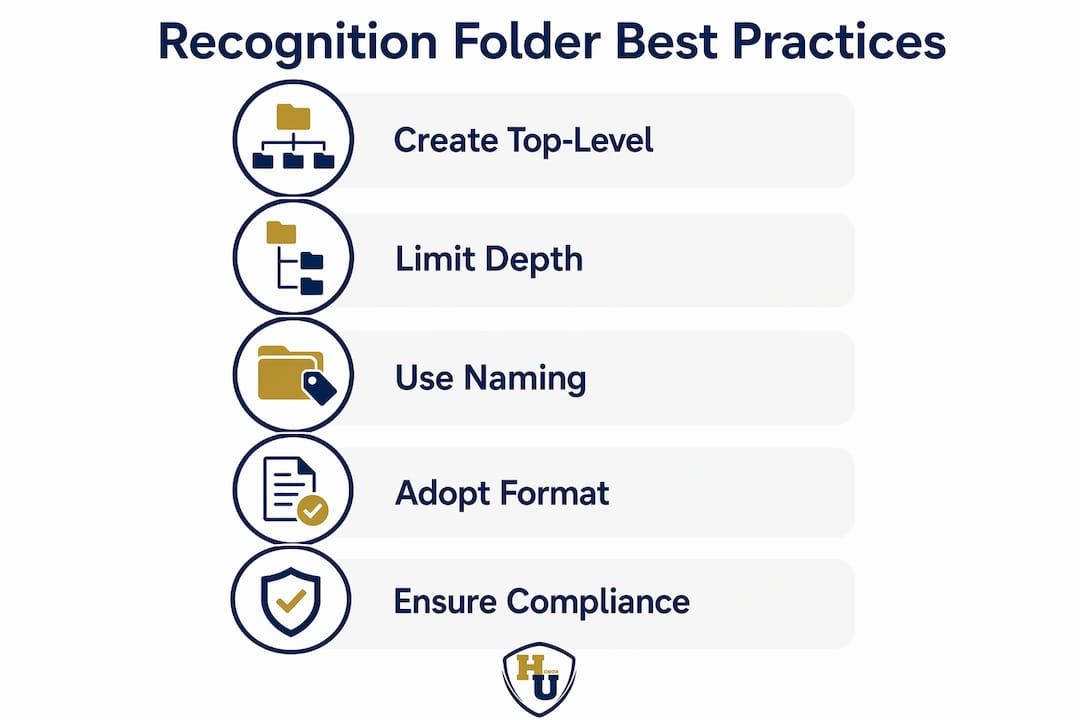
Pro Tip: Create a dedicated top-level folder labeled “Recognition Records” before adding any subfolders. This single structural decision prevents award documents from scattering across general file systems over time.
Why folders carry psychological weight in recognition systems
Folders do more than define location. Folder browsing activates the hippocampus, the brain region associated with spatial navigation and memory, which explains why people find folder-based organization intuitively satisfying even when keyword search is technically faster. This neurological preference has direct implications for recognition: when an achievement is stored in a dedicated, clearly labeled folder, the act of opening that folder carries a sense of ceremony that a search result cannot replicate.

Folders psychologically reinforce the importance of the documents they contain. A diploma placed in a premium presentation cover and stored in a labeled folder communicates that the organization regards this achievement as significant. That signal matters to recipients, whether they are a new graduate, a certified healthcare professional, or a military service member receiving a commendation.
Physical folders carry this effect most powerfully. A tangible certificate holder with metallic foil printing and a structured tent-style design creates what might be called an heirloom feel, a sense that the document inside is worth preserving across years, not just filing away. Digital folders, by contrast, offer accessibility and redundancy but lack the ceremonial weight of a physical presentation.
“The folder is not just a container. It is a statement about the value of what is inside.”
Organizations that invest in quality presentation folders for their recognition programs report stronger employee engagement with award ceremonies and higher perceived value of the credentials being distributed. A hospital that presents nursing certifications in custom-branded document covers signals institutional pride in a way that a plain envelope never could. The same principle applies to university graduation ceremonies, corporate leadership academies, and nonprofit volunteer recognition programs.
The distinction between physical and digital folders in this context is not a competition. Each serves a different psychological function. Physical folders anchor the moment of recognition in a tangible, lasting object. Digital folders extend the life and accessibility of that record across systems and years.
What are the best practices for structuring recognition folders?
Folder structure is where good intentions most often break down. Over-nesting folders leads to cognitive overload, and the practical recommendation from document management experts is to limit folder depth to three or four levels. Beyond that threshold, users begin to lose their mental map of the system, and the folder structure that was meant to help becomes an obstacle.
For recognition document management, a three-level hierarchy works well in most organizational contexts. The first level defines the scope, such as “2026 Awards.” The second level defines the category, such as “Employee of the Year” or “Training Certifications.” The third level holds the individual documents, named with enough specificity to be self-identifying. This structure keeps navigation intuitive without requiring users to memorize a complex taxonomy.
Naming conventions are equally critical, and naming outweighs folder location as the primary recognition signal in most retrieval scenarios. A file named “2026-03-15_Martinez_LeadershipAward” communicates its contents immediately, regardless of which folder it lives in. A file named “scan001.pdf” communicates nothing, even if it is stored in the correct folder.
The table below compares two common approaches to folder structure and naming for recognition document systems:
| Approach | Folder depth | Naming convention | Best for |
|---|---|---|---|
| Shallow and wide | 2-3 levels | YYYY-MM-DD_Name_Type | Large organizations with many document types |
| Deep and narrow | 5+ levels | Generic or sequential | Small teams with few document types (not recommended at scale) |
| Hybrid with metadata | 3-4 levels | Descriptive with date prefix | Mid-size institutions balancing search and browse |
Poorly structured folder systems cause increased decision fatigue, onboarding delays, and a greater risk of document loss. The data is direct: 83% of employees recreate documents because they cannot locate the originals. In a recognition context, recreating a diploma or award certificate is not simply an inconvenience. It undermines the credibility of the original achievement.
Pro Tip: Adopt the format YYYY-MM-DD_RecipientName_AwardType as your standard file naming convention for all recognition documents. This format sorts chronologically by default and makes any file self-identifying at a glance.
Standardized folder structures also reduce compliance risk. 70% of companies report significant data governance challenges, and recognition documents, particularly professional licenses and regulatory certifications, are frequently subject to audit. A consistent folder and naming system means that any authorized reviewer can locate and verify credentials without requiring institutional knowledge of where things are stored.
The onboarding benefit is equally practical. When a new HR coordinator joins a university or corporate training department, a well-documented folder structure allows them to manage recognition records from day one. Without it, institutional knowledge walks out the door every time a staff member leaves.
Physical vs. digital document folders for recognition: which works better?
The honest answer is that neither format is superior on its own. Physical folders provide tangible protection and ceremony, while digital folders offer accessibility, backup redundancy, and text search capabilities, particularly when paired with OCR technology that makes scanned documents fully searchable. The most effective recognition systems use both in complementary roles.
Physical document folders serve the moment of recognition. A tent-style diploma cover presented at a graduation ceremony, a custom certificate holder distributed at a corporate awards banquet, or a branded document case given to a military honoree all perform a function that no digital file can replicate. They make the achievement visible, tangible, and worth displaying. Organizations that invest in quality diploma presentation report that recipients are significantly more likely to display their credentials publicly when they are housed in a premium cover.
Digital folders serve the long-term management of recognition records. Cloud-based document management systems allow HR teams to retrieve any certification instantly, share credentials with third-party verifiers, and maintain backup copies that survive physical loss or damage. When a healthcare organization needs to verify a nurse’s board certification during an audit, the digital folder is the asset that matters.
The table below outlines the key strengths and limitations of each format:
| Format | Key strengths | Primary limitations |
|---|---|---|
| Physical folders | Ceremonial value, tangible protection, display-ready | Limited searchability, vulnerable to physical damage |
| Digital folders | Fast retrieval, backup redundancy, OCR search, easy sharing | No ceremonial presence, dependent on system access |
| Combined approach | Full lifecycle management from ceremony to archive | Requires coordination between physical and digital workflows |
A practical workflow for schools and HR departments looks like this: present the diploma or certificate in a premium physical folder at the recognition event, then scan and file the document digitally within a standardized folder structure within 48 hours. This approach honors the moment and protects the record. Tools like Scanner Pro for mobile scanning and platforms such as Google Drive or SharePoint for cloud storage support the digital side of this workflow efficiently.
The document presentation folder guide for education and HR contexts reinforces this dual approach, noting that the physical presentation folder sets the tone for how the credential is perceived, while the digital record ensures it remains accessible and verifiable over time.
Key takeaways
Document folders serve recognition best when physical presentation and digital organization work together, each reinforcing the value and accessibility of the achievement they contain.
| Point | Details |
|---|---|
| Retrieval efficiency matters | Poor folder organization costs professionals up to 50 hours per year in lost search time. |
| Folders carry psychological weight | Dedicated folders signal institutional respect for the achievement they contain. |
| Limit folder depth to 3-4 levels | Deeper nesting causes cognitive overload and system abandonment across teams. |
| Naming conventions drive findability | A format like YYYY-MM-DD_Name_Type makes files self-identifying regardless of folder location. |
| Physical and digital folders are complementary | Physical covers serve the ceremony; digital folders serve the archive and compliance record. |
Why the folder is the first impression of the achievement
I have worked with enough schools, HR departments, and training organizations to know that the folder conversation almost always starts too late. Teams spend months designing a recognition program, selecting award criteria, and coordinating ceremony logistics, then hand the diploma to the recipient in a plain paper sleeve because no one budgeted for presentation covers. That moment lands flat, and it is entirely avoidable.
The folder is not an afterthought. It is the first physical impression the recipient has of the credential they just earned. A well-made presentation cover communicates that the organization regards the achievement as significant. A flimsy or generic folder communicates the opposite, regardless of how meaningful the award itself is.
What I have found consistently is that organizations underestimate how much the physical container shapes the perceived value of the document inside. A nursing certification presented in a custom-branded cover with metallic foil printing feels categorically different from the same document in a standard folder. The credential is identical. The experience of receiving it is not.
On the digital side, I have seen the opposite problem: teams that invest heavily in folder structure but neglect the physical presentation entirely. They have beautifully organized SharePoint libraries and zero ceremony at the moment of recognition. Neither extreme serves the recipient well.
The future of recognition document management points toward AI-assisted folder systems that auto-tag and categorize scanned credentials on upload, reducing the manual labor of digital filing. But the physical presentation folder will remain irreplaceable for the same reason a handwritten note outperforms an automated email. It signals that someone made a deliberate choice to honor the moment.
The types of document folders available today range from simple certificate sleeves to fully custom tent-style covers with institutional branding. Choosing the right format for your recognition program is one of the highest-return decisions you can make for recipient experience.
, Manager
How Wehonoru supports your recognition document program
Wehonoru designs and produces premium tent-style document covers built specifically for diplomas, certificates, and awards. Every cover ships within one business day, with no minimum order quantity and no setup fees, making professional presentation accessible whether you are honoring one graduate or an entire class.

Wehonoru’s covers are available in custom dimensions for non-standard document sizes, with metallic foil printing options for institutional logos, names, and award text. Schools, corporate HR teams, healthcare organizations, and government agencies use Wehonoru covers to give their recognition programs the presentation quality they deserve. The Classic Diploma of Graduation tent-style cover is the flagship product, combining durable construction with an heirloom-quality finish that recipients are proud to display. Free shipping applies to orders over $35.
FAQ
What is the role of document folders in recognition?
Document folders organize, protect, and present recognition materials such as diplomas, certificates, and awards in a way that preserves their integrity and communicates their institutional value. Both physical and digital folders contribute to how quickly credentials are retrieved and how meaningfully they are perceived.
How deep should a recognition folder structure be?
Folder depth should be limited to three or four levels to prevent cognitive overload and system abandonment. A structure of Scope, Category, and Individual Document covers the needs of most schools, HR departments, and government agencies without creating navigation complexity.
What naming convention works best for recognition documents?
The format YYYY-MM-DD_RecipientName_AwardType is the most widely recommended convention because it sorts chronologically by default and makes each file self-identifying. Consistent naming conventions outperform folder location as the primary recognition signal in most retrieval scenarios.
Do physical folders still matter when digital records exist?
Physical folders serve a ceremonial function that digital records cannot replicate. A premium presentation cover makes the moment of recognition tangible and memorable, while the digital record handles long-term accessibility and compliance verification. Both serve distinct and necessary roles.
How do document folders support compliance in recognition programs?
Standardized folder structures and naming conventions ensure that professional licenses, regulatory certifications, and award records can be located and verified quickly during audits. 83% of employees recreate documents due to poor organization, a risk that directly affects compliance integrity in regulated industries such as healthcare and government.
Recommended
Taylor Pace writes Honor U guides. Blair Black reviews them. Honor U sells empty covers and holders.